If this scenario sounds familiar, you aren’t alone. Thousands of retail store owners, startup founders, and growing ecommerce brands handle their stock using a mix of sticky notes, memory, and chaotic, manual spreadsheets. While that might work when you’re selling five items a day out of a garage, it quickly turns into a logistical nightmare as your business grows.
Managing physical goods shouldn’t feel like a high-stakes guessing game. That’s where an modern Inventory Management System comes into play. In this friendly, comprehensive guide, we are going to unpack exactly what an inventory system is, how it functions without the complex tech jargon, and how smart tools can completely transform your daily business stress into smooth, automated profitability.
What is Inventory?
Before we talk about managing it, let’s define what “inventory” actually means in plain English. Simply put, inventory is the total collection of raw materials, goods in progress, and finished products that a business owns and intends to sell to customers for a profit.
Depending on the industry you are in, your inventory can look very different:
- For Retailers and Ecommerce Stores: Finished goods ready for purchase, like clothes, electronics, or packaged foods.
- For Manufacturers and Craft Producers: Raw ingredients or parts (like fabric, wood, or microchips) waiting to be assembled, plus partially finished items on the production line.
- For Restaurants and Bakeries: Fresh produce, flour, meats, packaging materials, and beverages that must be consumed before they spoil.
Think of your inventory as cash sitting on shelves. Every single item represents money your business spent with the goal of turning it into more money later. If it sits too long, it loses value; if it disappears or breaks, you lose money outright.
What is an Inventory Management System?
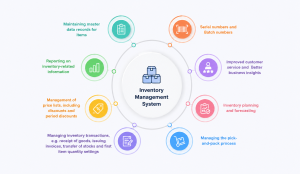
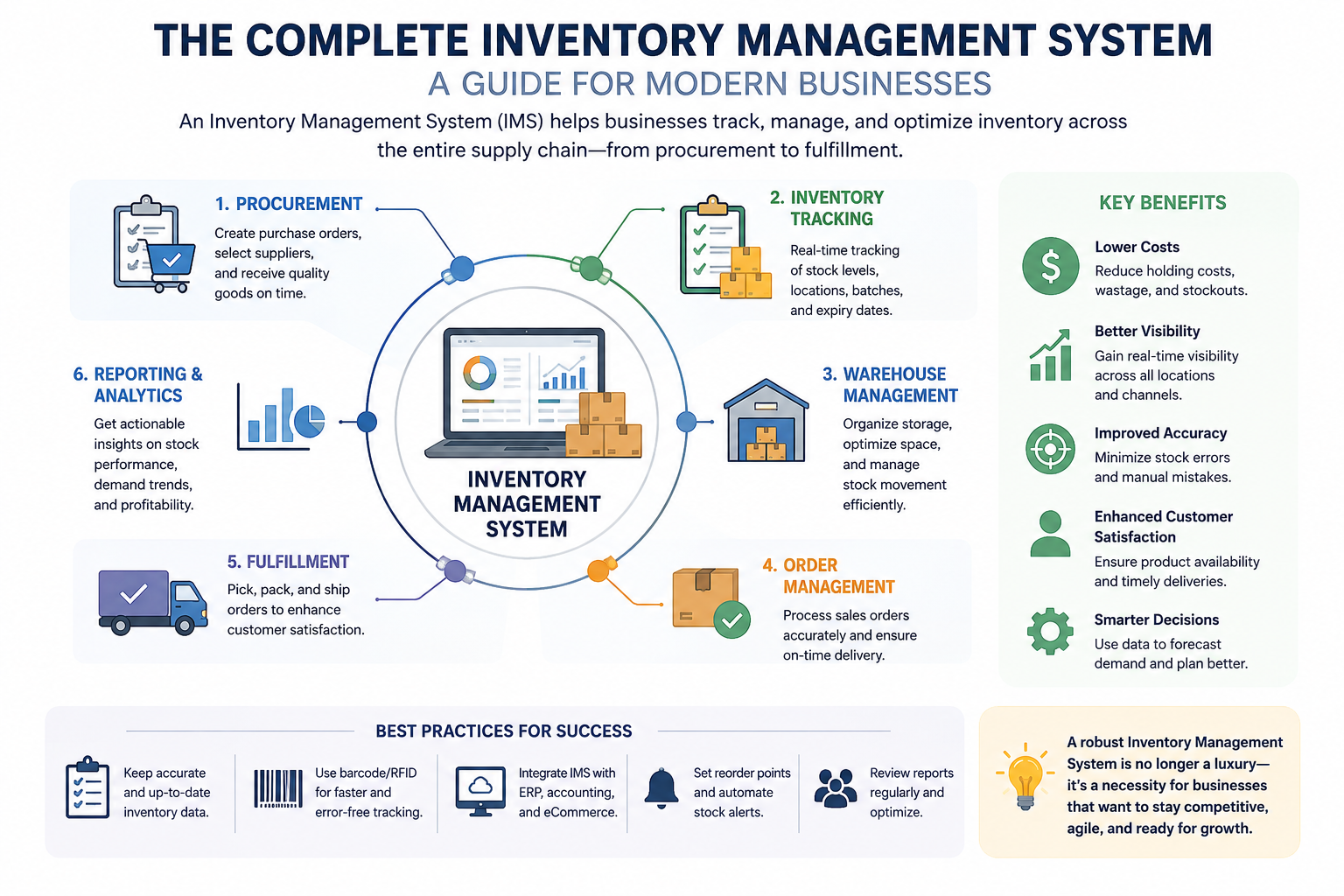
An Inventory Management System (sometimes referred to as Stock Management Software or an Inventory Control System) is a digital platform that acts as the single source of truth for everything your business owns. It tracks your items from the exact moment you buy them from a supplier to the precise second they are packed, shipped, and delivered to a customer.
In the old days, inventory tracking meant walking through a dark warehouse with a clipboard and counting boxes by hand. Today, software automates this entire loop. When a customer buys a pair of shoes on your website, a cloud inventory software instantly updates your records, reduces the count by one, alerts your packing team, and can even trigger a reorder note to your manufacturer if you’re running low.
It bridges the gap between your physical products, your online and offline sales points, and your backend purchasing team, ensuring everyone sees the exact same data in real time.
Why Inventory Management is Crucial for Your Survival
Let’s be honest: no one starts a passion project or an independent brand because they love counting boxes. You do it to create great products and build wealth. However, poor stock tracking is one of the top reasons small businesses and startups collapse within their first few years.
Proper management keeps your business healthy in three fundamental ways:
- Cash Flow Protection: Cash flow is the net amount of cash moving in and out of your business. Buying too much inventory ties up your liquid cash, leaving you unable to pay rent, run marketing campaigns, or handle emergencies.
- Customer Trust: If a buyer orders an item online only to receive an embarrassing “Sorry, we are out of stock” email two days later, they won’t come back. Consistency builds trust; mistakes drive customers straight to your competitors.
- Space Efficiency: Warehouse or retail shelf space costs money per square foot. Storing items that nobody wants means you’re wasting expensive real estate that could be used for your fastest-selling products.
💡 The Golden Rule: Think of inventory management as balancing a financial scale. Too little stock means lost sales and angry buyers; too much stock means drained bank accounts and clogged storage rooms. The goal is to hit the sweet spot right in the middle.
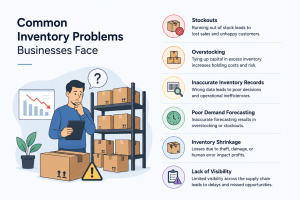
Common Inventory Problems Businesses Face
If you are currently managing your products without dedicated software, you’ve likely bumped into at least two or three of these expensive, exhausting roadblocks:
-
Stockouts (When Products Run Out Too Soon)
A stockout happens when a business completely runs out of a product that customers still want to buy. This usually occurs because of poor inventory planning, delayed supplier deliveries, or sudden increases in customer demand. For example, imagine a grocery store running out of milk during a holiday weekend when customer demand is very high. Customers leave disappointed and may choose a competitor instead. Repeated stockouts not only reduce sales revenue but also damage customer trust and brand reputation.
-
Overstocking (Too Much Inventory Sitting Unsold)
Overstocking occurs when a company stores more inventory than it can sell within a reasonable time period. Businesses often overstock because of inaccurate sales predictions, bulk purchasing, or fear of future shortages. For instance, a fashion retailer may order thousands of trendy jackets, but customer preferences change before all items are sold. The unsold products occupy warehouse space and increase storage costs. Overstocking also blocks company money that could have been invested in other profitable areas.
-
Inaccurate Inventory Records (When System Data Is Wrong)
Inaccurate inventory records happen when the inventory shown in the system does not match the actual physical stock available in the warehouse or store. This problem is usually caused by manual entry errors, theft, damaged items, or failure to update stock movements in real time. For example, a company’s software may show 100 units available, but only 70 are physically present on the shelves. As a result, businesses may accept customer orders they cannot fulfill, leading to delays and unhappy customers. Incorrect records also affect purchasing and financial decisions.
-
Poor Demand Forecasting (Predicting Demand Incorrectly)
Poor demand forecasting occurs when businesses fail to accurately estimate future customer demand for products. Companies may ignore seasonal trends, market conditions, customer behavior, or historical sales data. For example, an umbrella manufacturer may underestimate demand before the rainy season and produce too few products. This leads to stock shortages and missed sales opportunities. In other cases, overestimating demand can result in overstocking. Poor forecasting creates inefficiencies throughout the entire inventory management process.
-
Inventory Shrinkage (Inventory Disappearing Unexpectedly)
Inventory shrinkage refers to the loss of products due to theft, damage, misplacement, supplier fraud, or administrative mistakes. These losses often happen silently and may not be discovered until a physical inventory check is conducted. For instance, expensive electronic items may disappear from a warehouse because of employee theft or shipping damage that was never recorded properly. Shrinkage reduces profits and creates inaccurate inventory records. Over time, even small losses can significantly impact business performance.
-
Lack of Visibility (Not Knowing What’s Happening in Inventory)
Lack of visibility means a business cannot clearly monitor inventory levels, product movement, or warehouse activities in real time. This problem usually occurs when companies rely on outdated systems, spreadsheets, or disconnected software. For example, a business with multiple warehouses may struggle to identify which location currently has available stock for urgent customer orders. Employees waste time checking records manually, which slows down operations and increases errors. Poor visibility makes decision-making difficult and weakens overall supply chain efficiency.
7. Spoilage and Expiration
For grocery stores, cosmetic brands, and pharmacies, items have a hard clock ticking down. Without strict tracking, older items get pushed to the back of the shelf while newer stock is sold first, leading to expired goods that must be thrown away.
Key Features to Look for in an Inventory System
If you’re shopping around for a Stock Management Software, you will see a massive list of technical bullet points. Let’s simplify things. Here is the core, non-negotiable features you actually need to run a smooth operation:
- Real-Time Inventory Tracking: A centralized dashboard that updates instantly across your brick-and-mortar shop, your Shopify store, Amazon, and your warehouse when a sale happens.
- Barcode Scanning: Instead of typing long product names, you can scan a sticker with a barcode reader or smartphone to instantly add, move, or sell items.
- Automated Reorder Points: You set a minimum number for an item (e.g., 10 boxes). When stock hits that number, the system automatically drafts a reorder form for your supplier.
- Reporting and Analytics: The ability to generate clear sheets showing what is selling fast, what is sitting dead, and how much your current warehouse stock is worth financially.
- Software Integrations: Connecting seamlessly with your existing accounting tools (like QuickBooks or Xero) and shipping providers (like DHL or FedEx) so you don’t have to copy-paste data manually.
- Stock Adjustment Management: Quickly update inventory quantities when products are damaged, expired, returned, or physically counted during stock audits.
- Multi-Warehouse Management: Manage inventory across multiple warehouses or store locations from one centralized system without confusion.
- Shrinkage Management: Track inventory losses caused by theft, damage, misplacement, or operational errors to reduce unnecessary business losses.
- Stock Transfer Management: Easily transfer products between warehouses, stores, or branches while keeping inventory records updated in real time.
Types of Inventory Management Systems
-
Manual / Spreadsheet Tracking
This involves using free tools like Microsoft Excel or Google Sheets. While it’s fine for absolute beginners or hobbyists with fewer than 20 items, it relies entirely on human memory. One forgotten typo can completely throw off your entire business financial statement.
-
Periodic Inventory Systems
With a periodic approach, you don’t track sales continuously. Instead, your team stops operations once a week or once a month to physically count everything. It’s simple but leaves you completely blind to your real stock levels between those counting periods.
-
Perpetual (Real-Time) Systems
This is the gold standard for modern business. A perpetual system updates your quantities automatically every single time a transaction occurs. Whether a barcode is scanned at a register or an order is processed online, your database is perfectly accurate 24/7.
-
Enterprise Resource Planning (ERP) Modules
For massive corporations and complex manufacturing plants, inventory is bundled into a massive, multi-department corporate software called an ERP. These are incredibly powerful but are generally too expensive, slow, and overly complex for small-to-medium businesses.
Step-by-Step: How an Inventory System Actually Works
To demystify the tech, let’s trace a single product’s life cycle through a modern, cloud inventory software system from start to finish:
Step 1: Receiving the Goods. Your supplier sends a shipment of 100 coffee mugs to your stock room. Your worker uses a barcode scanner to scan the master box. The system instantly adds 100 units to your available stock count, logs the cost price, and updates your financial books.
Step 2: Storage and Tracking. You move 20 mugs to your physical retail shelves and keep 80 in the back warehouse. The software logs these exact locations so your staff never wanders around searching for a missing box.
Step 3: The Sale. A customer clicks “Buy Now” on your website. The platform instantly drops your public stock count from 100 to 99 across all sales channels simultaneously, preventing anyone else from buying an item you don’t have.
Step 4: Fulfillment. The system prints a packing slip with the precise aisle and shelf number for your warehouse picker. They grab the item, scan it one last time to confirm it’s correct, and hand it to the courier.
Step 5: Automated Alerts. Over the next month, your mugs sell out steadily. When the remaining count hits your pre-set threshold of 15, the system blinks amber and emails your manager a pre-filled purchase order for the next batch.
The Tangible Benefits of Upgrading to Software
- Saves Massive Time: Stop spending hours every Sunday cross-referencing paper receipts or manually updating messy spreadsheets. Let the system handle the numbers while you focus on growth.
- Eliminates Human Error: Human beings make mistakes, especially when tired or stressed. Software doesn’t misplace decimal points or forget to write down a cash sale.
- Optimizes Working Capital: By knowing exactly what sells best during specific months, you can purchase inventory strategically. This frees up frozen capital, giving you more liquid cash to expand your business.
- Professional Reliability: When a client calls asking if a specific part is available, you can check your phone app and give a definitive, confident answer in two seconds flat.
Inventory Management Techniques Explained Simply
FIFO (First In, First Out)
This technique means you sell your oldest stock first before touching the newest shipments. This is absolutely mandatory for businesses dealing with perishable food, cosmetics, or medicines to prevent costly spoilage. Even for non-perishables like apparel, FIFO ensures packaging doesn’t get dusty and old in the dark corners of your warehouse.
FIFO Example: Milk Packets in a Store
Imagine a shopkeeper receives milk packets every morning.
Day 1
The shop receives:
- 50 milk packets
These packets are placed on the shelf first.
Day 2
The shop receives:
- 40 new milk packets
Instead of selling the new packets first, the shopkeeper sells the older Day 1 packets first.
This is called FIFO — First In, First Out.
The products that came into the store first are sold first.
Why FIFO is Important
Milk expires quickly.
If the shopkeeper sells the newest packets first, the older packets may expire and get wasted.
Using FIFO helps:
- Reduce product waste
- Keep products fresh
- Avoid losses
- Manage inventory properly
LIFO (Last In, First Out)
The opposite of FIFO, where the newest stock received is sold first. This is rarely used for physical fulfillment, but some specific industries use it for accounting and tax strategies during times of high economic inflation to match current high costs against current revenue.
LIFO Example: Sand Storage Business
Imagine a construction supplier stores sand in a big pile.
Step 1
On Monday:
- 10 tons of sand are added to the storage area.
Step 2
On Tuesday:
- Another 8 tons of sand are added on top of the old pile.
Step 3
When a customer comes to buy sand:
- Workers usually take the sand from the top of the pile first.
That means:
- The newest sand (Tuesday stock) is used first.
- The older sand remains at the bottom.
This is called LIFO — Last In, First Out.
Why Businesses Sometimes Use LIFO
LIFO is commonly used when:
- Items are stacked on top of each other
- Older and newer stock look similar
Expiry dates are not important
ABC Analysis (Prioritizing What Matters)
Not every product in a business is equally important. Some products bring in more profit, while others are used regularly but cost very little. ABC Analysis helps businesses organize inventory into three categories so they can focus on what matters most.
Category A – High-Value Items
These are expensive or highly profitable products that need close attention and careful tracking.
Example:
A mobile phone store may sell premium smartphones like iPhones or flagship Samsung devices. Even if only a few are kept in stock, they generate a large part of the store’s revenue. Because these products are costly, the business checks them regularly and stores them securely.
Category B – Medium-Value Items
These products are moderately important. They sell consistently and require normal inventory monitoring.
Example:
In the same mobile store, products like wireless earphones, smartwatches, or phone cases may fall into this category. They are important for daily sales but are not as expensive as premium smartphones.
Category C – Low-Value Items
These are low-cost items that businesses use or sell in large quantities. They do not need strict tracking because losing a few pieces usually does not create a major financial impact.
Example:
Items like charging cables, packaging boxes, bubble wrap, or tape are Category C products. Businesses usually buy these in bulk and restock them when needed.
Why ABC Analysis Matters
ABC Analysis helps businesses spend more time managing important products instead of treating every item the same way. This improves stock control, reduces waste, and helps businesses save money while keeping operations smooth.
Who Needs an Inventory System? (Industries Explained)
- Retail & Ecommerce: Needs to coordinate stock across multiple digital stores, physical storefronts, and third-party fulfillment centers simultaneously to prevent overselling.
- Business Inventory Tracking for Manufacturing: Must track complex bills of materials (ingredient lists), monitor raw steel or plastic supplies, and predict when production lines will run dry.
- Healthcare & Pharmacies: Needs to monitor expiration dates down to the exact batch number, manage refrigeration tracking, and comply with strict medical regulations.
- Restaurants & Hospitality: Tracks recipe ingredients down to the ounce. If a chef uses a pound of cheese for pasta, a restaurant system reduces the dairy inventory accordingly to prevent surprise weekend shortages.
Inventory Management vs. Warehouse Management: What’s the Difference?
| Basis | Inventory Management | Warehouse Management |
| Main Focus | Focuses on managing inventory levels and stock value. | Focuses on managing warehouse operations and storage activities. |
| Key Question Answered | “What products do we have and how much stock is available?” | “Where is the product located and how is it moved?” |
| Purpose | Ensures the right quantity of products is available at the right time. | Ensures efficient storage, handling, and movement of goods inside the warehouse. |
| Area of Operation | Covers the overall inventory across stores, warehouses, and supply chains. | Limited to activities within a specific warehouse or storage facility. |
| Tracks | Product quantities, stock levels, inventory value, sales trends, reorder levels. | Shelf locations, bin numbers, picking routes, packing processes, staff movement. |
| Main Activities | Stock tracking, demand forecasting, inventory valuation, replenishment planning. | Receiving goods, storage allocation, picking, packing, shipping, warehouse safety. |
| Goal | Prevent stockouts and overstocking while maximizing profitability. | Improve warehouse efficiency, speed, and space utilization. |
| Technology Used | Inventory Management System (IMS), ERP software. | Warehouse Management System (WMS), barcode scanners, RFID systems. |
| Example | Knowing you own 500 shirts and need to reorder 100 more next week. | Knowing the shirts are stored in Aisle 3, Shelf B, Bin 12. |
| Business Impact | Helps improve inventory control, sales planning, and financial management. | Helps improve warehouse productivity, accuracy, and faster order fulfillment. |
| Focus Type | “What” and “How Much.” | “Where” and “How.” |
| In Simple Words | Manages inventory availability and stock value. | Manages the physical storage and movement of inventory |
5 Warning Signs Your Business Needs Inventory Software Right Now
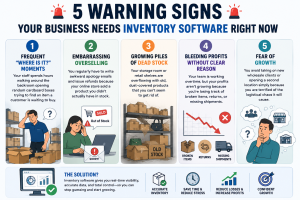
- 1. Frequent “Where is it?” Moments: Your staff spends hours walking around the backroom opening random cardboard boxes trying to find an item a customer is waiting to buy.
- 2. Embarrassing Overselling: You regularly have to write awkward apology emails and issue refunds because your online store sold a product you didn’t actually have in stock.
- 3. Growing Piles of Dead Stock: Your storage room or retail shelves are overflowing with old, dust-covered products that you can’t seem to get rid of.
- 4. Bleeding Profits Without Clear Reason: Your team is working overtime, but your profits aren’t growing because you’re losing track of broken items, returns, or missing shipments.
- 5. Fear of Growth: You avoid taking on new wholesale clients or opening a second location simply because you are terrified of the logistical chaos it will cause.
How an Inventory Management System Solves These Problems
1. No More “Where Is It?” Confusion
An inventory management system keeps every product location updated in real time. Your staff can quickly check where an item is stored instead of wasting time searching through shelves and boxes. This helps customers get faster service and makes your team more productive.
2. Prevents Overselling and Refund Hassles
The system automatically updates stock levels whenever a sale happens — whether it’s from your retail store, website, or marketplace. This means you always know what’s actually available in stock, reducing cancelled orders, refunds, and unhappy customers.
3. Helps You Clear Dead Stock
Inventory software shows which products are selling fast and which items are sitting untouched for months. With clear reports and insights, you can plan discounts, offers, or smarter purchasing decisions to avoid overstocking products that don’t move.
4. Gives Better Control Over Profits
When inventory is tracked properly, it becomes easier to monitor damaged items, returns, missing stock, and purchase costs. This reduces unnecessary losses and helps business owners understand where money is being wasted. As a result, your business operations become more efficient and profitable.
5. Makes Business Growth Easier
Expanding your business becomes much less stressful when your inventory is organized and automated. Whether you want to add a new warehouse, open another store, or handle larger orders, an inventory management system helps you manage everything smoothly from one place without creating confusion.
How to Choose the Right Inventory Software for Your Business
- Ease of Use: The software must feel intuitive. If it requires a 30-day corporate training course just to figure out how to add a new product, your staff will hate it, bypass it, and revert to old habits.
- Seamless Integrations: Ensure the tool has native, plug-and-play integrations with your website builder (Shopify, WooCommerce, Magento), your registers (Square, Clover), and your accounting sheets.
- Mobile and Cloud Access: If you run a food truck or manage multiple warehouses across the country, you need a mobile-friendly cloud inventory software that lets you check real-time stock levels directly from your smartphone.
- Reliable Customer Support: Look for companies that offer 24/7 responsive human help. When a system glitch happens right before a holiday rush, you can’t afford to wait five days for an email response.
- Better Security with Role-Based Access (RBAC): With RBAC, you can control who gets access to different parts of your inventory system. Staff members only see the features they need for their work, while managers can handle reports and approvals. This helps prevent mistakes, keeps important business data secure, and makes daily operations more organized. It also improves team management and gives business owners better control over the system.
Complete Business Overview Through Dashboard
A smart dashboard gives you a clear view of your entire inventory in one place. You can easily track stock levels, sales, purchases, returns, and low-stock items without checking multiple files or systems. It helps business owners make faster decisions with real-time data and simple reports. This improves planning, reduces errors, and keeps daily operations running smoothly.
Future Trends in Stock Tracking
Beyond AI, the landscape of global supply chain management is evolving rapidly. We are seeing widespread adoption of RFID (Radio Frequency Identification) tags, which allow a business owner to scan an entire pallet of mixed items instantly without opening the box. Cloud-based global tracking is also becoming more affordable, allowing small businesses to track shipments across oceans in real-time, bringing institutional-grade supply power to small, independent boutique owners.
Get Warehouse, Inventory, and POS in One Integrated System
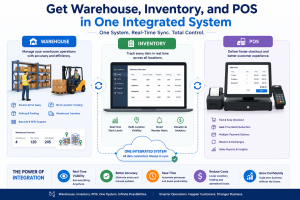
An integrated inventory management system helps businesses manage warehouse operations, inventory tracking, and billing in one single platform. Instead of using different software for different tasks, everything works together in one connected system.
When a product is sold through the POS (Point of Sale) system, the inventory updates automatically, and the warehouse stock is adjusted in real time. This helps businesses avoid stock confusion, reduce manual work, and improve accuracy.
With one integrated system, businesses can easily:
- Track stock levels
- Manage warehouse inventory
- Handle billing and sales
- Monitor product movement
- Save time and reduce errors
- Manage GST and VAT taxation easily for their respective region.
This system is useful for retail stores, supermarkets, pharmacies, restaurants, and many other businesses that handle daily stock and sales operations.
Why Forward-Thinking Businesses Partner with Averiq Solutions
At Averiq Solutions, we know that you didn’t build your business to become an expert in software integration or data architecture. You built it to craft incredible products, serve your community, and secure financial freedom.
We don’t just hand you a generic piece of software and wish you good luck. We design, customize, and implement tailored Business Inventory Tracking architectures that integrate perfectly into your unique business workflow. Whether you operate a bustling ecommerce storefront, a growing chain of pharmacies, or a multi-location manufacturing hub, we strip away the technical stress.
When you partner with Averiq Solutions, you get:
- System-First Architecture: We create a well-organized system where your inventory, sales, warehouse, billing, and business operations all work together smoothly from the beginning. This reduces confusion, avoids data mismatches, and helps your business run faster, smarter, and more efficiently as you grow.
- Tailored Architecture: Custom setups tailored to your specific industry constraints (FIFO tracking, multi-channel syncing, batch control).
- End-to-End Integration: Full, seamless connection with your current CRM, POS, and accounting ecosystems without data drops.
- Team Empowerment: Hands-on, step-by-step training for your employees so your team feels confident from day one.
- Ongoing Strategic Support: A team of passionate business operational experts dedicated to keeping your digital systems running at maximum efficiency.
Conclusion: Stop Guessing, Start Growing
Every single minute you spend chasing lost boxes, correcting broken spreadsheets, or worrying about whether you have enough stock to survive the holiday rush is time stolen away from growing your brand, marketing your services, and spending time with your family.
Your inventory shouldn’t be an unpredictable source of stress. It is your most valuable asset, and it deserves a reliable, professional system to protect it. Moving to an automated tracking platform is the single most impactful operational upgrade a growing business can make.
Are you ready to eliminate manual errors, free up tied-out cash flow, and build an operation that scales effortlessly? Don’t let messy stock hold your business back any longer. Reach out to our team at Averiq Solutions today for a personalized consultation, and let’s design an inventory system that empowers your business to thrive.
🚀 Ready to Get Started?
Contact Averiq Solutions today for a free consultation. Let us build a custom School Management System that fits your school perfectly.
Visit: – https://www.averiqsolutions.com/contact/ or info@averiqsolutions.com
Frequently Asked Questions (FAQs)
Q: What is the difference between an inventory system and a POS (Point of sale) system?
A: An inventory management system tracks stock counts, orders, and sales across your business. A POS (Point of Sale) system is the digital cash register where your customer pays for their item. When integrated, your POS tells your inventory software exactly what was just sold, keeping your stock counts perfectly synchronized.
Q: Can I run an inventory management system from my phone or while traveling?
A: Absolutely! Cloud inventory software lets you manage everything through your web browser or a mobile app. You can check stock, approve purchase orders, and monitor your warehouse operations from a coffee shop, your home, or while traveling abroad.
Q: Is it difficult for a non-technical person to learn stock management software?
A: Not at all. Modern platforms are designed with intuitive, clean interfaces specifically for small business owners and retail staff. If you know how to use an online banking app or navigate a smartphone, you can easily master a modern inventory control system with just a few hours of basic guidance.
Q: Why shouldn’t I just use a free Excel spreadsheet for my stock tracking?
A: While Excel is completely free and works fine when you have a handful of items, it relies entirely on manual data entry. It cannot update automatically when an online sale happens, it won’t alert you when stock is low, and a single accidental deletion can ruin your entire business record. Specialized software eliminates these risks through automation.
Q: Can the software handle multiple store locations or different warehouses?
A: Yes, top-tier inventory software offers multi-location tracking. You can see precisely how many units of a specific product are at Location A, Location B, or sitting inside your primary distribution warehouse, and seamlessly transfer items between them.
Q: Can I export inventory data in CSV, Excel, or PDF format?
A: Yes, the inventory management system allows you to easily export reports and business data in multiple formats such as CSV, Excel, and PDF. This makes it simple to share reports, maintain records, and analyze business performance whenever needed.
Q: Is the inventory management system compatible with GST?
A: Yes, the system is fully compatible with GST. It helps businesses manage GST calculations, generate GST-ready invoices, and maintain accurate tax records for smoother billing and compliance.
Q: Does the inventory management system support VAT?
A: Absolutely. The system can also handle VAT-based taxation, making it suitable for businesses operating in regions where VAT is applicable. Tax calculations and reporting can be managed directly within the system.
Q: How can I manage multiple warehouse locations in the inventory management system?
A: The system allows you to manage inventory across multiple warehouses or store locations from one centralized dashboard. You can track stock levels, transfer products between locations, and monitor warehouse-wise inventory in real time.
Q: How does the system help manage inventory shrinkage?
A: The inventory management system helps track losses caused by damage, theft, expired products, or stock mismatches. With proper stock monitoring and adjustment features, businesses can identify shrinkage issues early and reduce unnecessary losses.